EXPERIENCE
I watched a 35 min online lecture by Zarar Chaudhri on the UAL academic support learning resources site.
https://academicsupportonline.arts.ac.uk/learning-resources/69554
I found it very useful and below are are my notes and thoughts.
What is a sketchbook:
– Have a portable sketchbook to carry around.
– Contains thoughts, ideas, notes, collect things.
– Fun and natural way to collect thoughts.
– No pressure to fill a sketchbook.
– Record my thought processes and inspiration. Ideas lab, how I get from A to B in my ideas and making process.
– Like a journal.
– Record the process of making. Record my journey of getting there.
– The most important aspect of my work is me. Sketchbook helps tell the story.
– Sketchbooks are meant to be messy. Not meant to be perfect.
– Process and heritage are key in the making process.
– Sketchbooks teach us discipline. Say, everyday or every other day, put something in the sketchbook.
– Pandora (jewellery) video showing the process, how it’s made by hand, starting with a sketch. Part of their corporate story telling.
– Same for Dior – video showing making process again started with a design sketch.
How to digitise the sketchbook:
Photograph or scanning
Photograph:
– Use natural flat light like daylight and shoot from above. Avoid ceiling lights.
– Can use mobile phone.
– Can use ring light from Amazon. Creates an even spread.
– Place the sketchbook on unique background to create interest. Add prop but do not distract from content e.g. put a pencil next to a pencil sketch. Try different styles.
Photographing emphasises the 3D aspect of the book instead of scanning, giving more creative approach.
Scanning:
– Easy to do, flat 2D look.
Basic Photoshop
– use spot healing tool to remove blemishes.
– Photoshop help available 9am to 6pm Mon to Fri. Go to Collaborate:
Basic Acrobat:
– File – Create – Compile into a single PDF.
– Adobe Acrobat DC can add, delete or move pages around.
Flipbook software
– Issuu / Yumpu
– Cam make a magazine
– Can email speaker for help with Flipbook.
Basic Copyright:
– Fair Use/Dealing law
– Do not fear showing your work.
– Use (c) Copyright – Name – Date if you want to copyright.
– Can use watermark in PDF. Can add Metadata copyright into photoshop or PDF file.
Where to start?
– Look online, YouTube to get ideas. Start somewhere then be disciplined, say one sketch a day.
– Example of sketchbook entry – take a photo of something on TV or when you’re out that you like, record voice note about what you like about it. Then put in sketchbook.
For further info:
z.chaudhri@arts.ac.uk
REFLECTIONS
It was a very useful session. I have bought a new sketchbook for the MA course but hadn’t used it yet. I have been capturing my ideas in an Ideals Lab blog. The blog is a good way to quickly note down ideas while they are fresh in my mind but I feel it does not offer the creative and ideas evolution ability in a way that a sketchbook does. So I know I need to make better use of my sketchbook and make it a meaningful part of my creative process. I must admit that I often used my sketchbook because I knew I was meant to, but I didn’t always find it useful. Hence I tended to go from ideas in my head straight to the canvas. I appreciate that approach does not enable me to maximise the ideas exploration part of my process and it’s something that I need to improve on.
It was useful to hear about the options for digitalising the sketchbook.
LEARNING
It was a good refresher to remind me of the usefulness of a sketchbook. But it’s only useful if I make it part of my process. A key learning is to find meaning in the sketchbook process, not just to use it, but use it to add value to the creative process. The only way is to start using it, keep experimenting, find enjoyment in using it and go from there.
NEXT STEPS
Use the new sketchbook to explore ideas for my next painting.
UPDATE
Using the sketchbook to develop ideas and process for the latest painting:
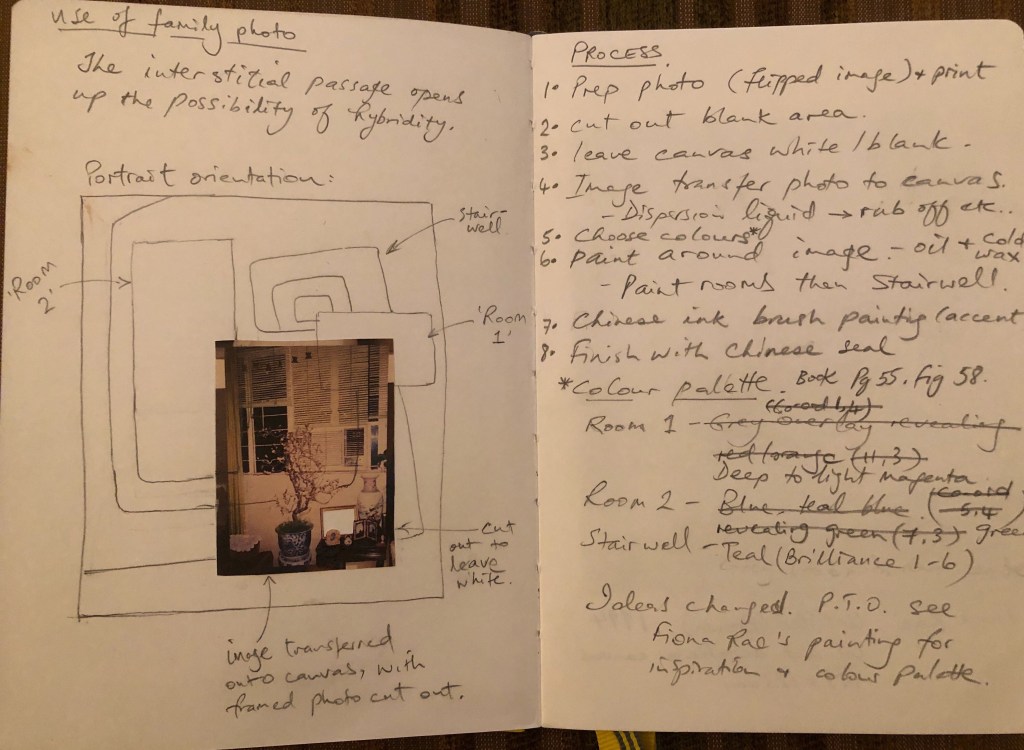
I’m happy with how the sketchbook helped me in the latest painting, but I need to continue to make it a natural part of my process.
 elizarawlings